Bantumi Game Using Tkinter in Python with Source Code
The Bantumi Game is an interactive desktop application built entirely with Python. The gameplay is similar to the original Bantumi game, where players...
Bantumi Game Using Tkinter in Python with Source Code
The Bantumi Game is an interactive desktop application built entirely with Python. The gameplay is similar to the original Bantumi game, where players take turns placing stones into pits. The Bantumi Game Using Tkinter features a fun and interactive experience that follows the rules of the traditional Bantumi game. This project is an excellent opportunity to reinforce essential programming concepts, making it a valuable exercise for improving your Python skills in game development. The Bantumi Game Using Tkinter in Python with Source Code is free to be downloaded just read the content below for more info. This application is for educational purpose only. Bantumi Game Using Tkinter in Python with Source Code Basic Information
Language used: Python Coding Tool used: Built-in Python IDLE Type: Desktop Application Database used: None
About Bantumi Game The Bantumi Game is an engaging and interactive desktop application developed using Python and the Tkinter library. Inspired by the traditional Mancala-style board game, the application allows players to strategically move and distribute stones across different pits in an attempt to collect the highest number of pieces and defeat their opponent. The game provides a visually appealing graphical user interface that makes gameplay simple, enjoyable, and easy to understand for players of all ages. Each move requires careful planning and strategy, making the game both entertaining and mentally stimulating. The application is designed with smooth gameplay mechanics, responsive controls, and clear game instructions to provide a better user experience. Using Tkinter, the game demonstrates how Python can be utilized to create interactive GUI-based applications with dynamic updates and event-driven functionality. The project also showcases essential programming concepts such as game logic implementation, condition checking, score tracking, turn management, and object-oriented programming techniques. This Bantumi Game project is an excellent practice application for beginners and intermediate developers who want to improve their Python skills while learning how to build fun and interactive desktop games. Bantumi Game Using Tkinter in Python with Source Code Features
Graphical User Interface (GUI)
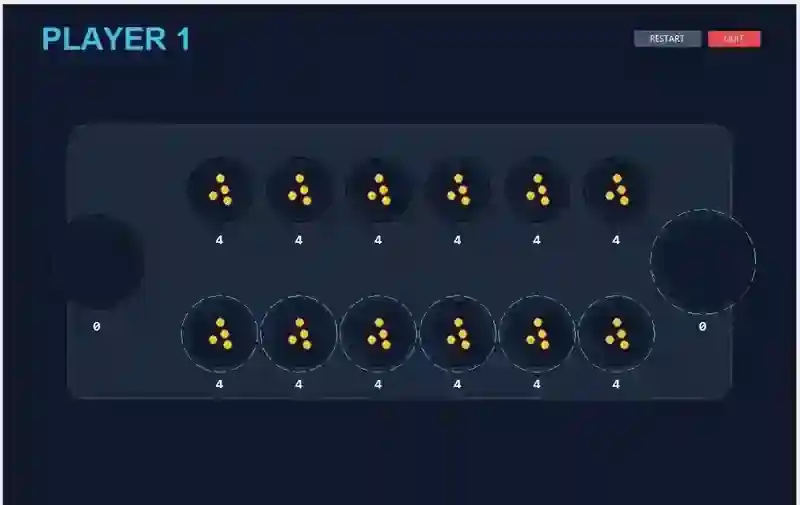
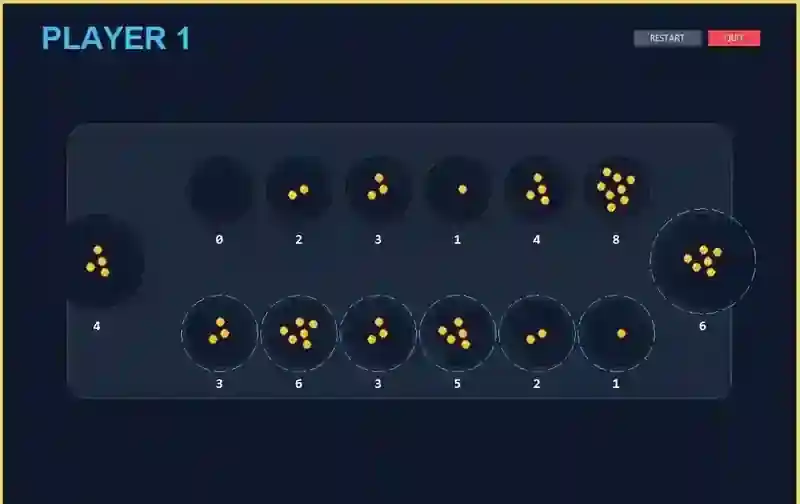
Built using Python’s Tkinter library. Interactive board game layout representing Bantumi pits and stores. Clearly displayed player sides, stones, and score areas. Buttons or clickable pits for player interaction.
Classic Bantumi Gameplay Mechanics
Implements traditional Bantumi/Mancala-style rules. Players distribute stones across pits strategically. Turn-based gameplay between two players. Capturing mechanics based on final stone placement.
Stone Distribution System
Automatically distributes stones counterclockwise. Updates pit counts dynamically after every move. Handles multi-pit traversal smoothly.
Sample Application Screenshot:
Bantumi Game Using Tkinter in Python with Source Code Installation Guide
First you need to download & install the Python IDLE's, here's the link "https://www.python.org/downloads/". Download the source code in this site. Locate and Extract the zip file. Open the extracted folder Locate the py file. Then open the file via python IDLE or any IDE that supports python language. Run the py file to launch the program.
That's all, The Bantumi Game was created fully functional using Python language. I hope that this project can help you to what you are looking for. For more projects and tutorials please kindly visit this site. Enjoy Coding! The Bantumi Game Using Tkinter in Python with Source Code is ready to be downloaded just kindly click the download button below. Related Projects & Tutorials Bantumi Game
Screenshots
Download Project
