QR (Quick Response) Code Generator using VB.NET with Source Code
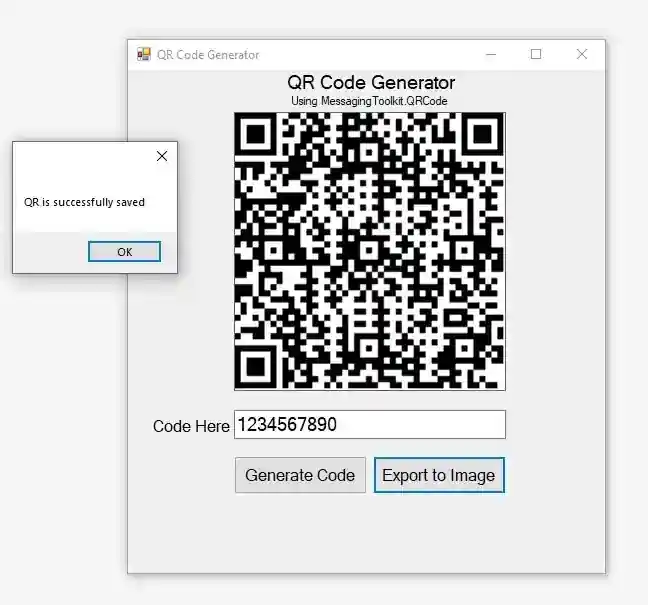
This QR (Quick Response) CODE Generator is a simple program that generates text into QR code using messaging toolkit QR code and developed using VB.NET. It also allows the QR code to be exported as an...
QR (Quick Response) Code Generator using VB.NET with Source Code
This QR (Quick Response) CODE Generator is a simple program that generates text into QR code using messaging toolkit QR code and developed using VB.NET. It also allows the QR code to be exported as an image and automatically saved into your Documents folder with the file name as equivalent in the textbox. The QR Code can be useful in some Software depending on what logic you will use. For Example in an Inventory System, you can generate a QR Code for each product or items and create a tracking feature that has a QR Code Scanning and by that, the system user will have a better experience using the system and also this can help to prevent Typing Error instances and the user can quickly track the item.
Features
Generate QR Code
Export QR Code as an Image
Tools used:
Labels
Picture Box
Buttons
Library Used
MessagingToolkit.QRCode
This is the Layout that I have created in this QR Code Generator program:
The below code is the one I used to generate QR Code from the text entered and display the code into the Picture Box.
Private Sub btnGenerate_Click(sender As Object, e As EventArgs) Handles btnGenerate.Click
Try
Call qrcodeGen()
Catch ex As Exception
MessageBox.Show(ex.Message, "Error!", MessageBoxButtons.OK, MessageBoxIcon.Information)
End Try
End Sub
Private Sub qrcodeGen()
Try
Dim qrCode As New QRCodeEncoder
qrCode.QRCodeEncodeMode = QRCodeEncoder.ENCODE_MODE.BYTE
qrCode.QRCodeErrorCorrect = QRCodeEncoder.ERROR_CORRECTION.L
Me.PictureBox1.Image = qrCode.Encode(Me.txtCode.Text, System.Text.Encoding.UTF8)
Catch ex As Exception
MessageBox.Show(ex.Message, "Error!", MessageBoxButtons.OK, MessageBoxIcon.Information)
End Try
End Sub
And to export the QR Code as an Image and saving it automatically to the Documents Folder, this is the code I used.
Private Sub btnExport_Click(sender As Object, e As EventArgs) Handles btnExport.Click
Try
If Me.PictureBox1.Image IsNot Nothing Then
Me.PictureBox1.Image.Save(IO.Path.Combine(My.Computer.FileSystem.SpecialDirectories.MyDocuments, Me.txtCode.Text & ".jpg"))
MessageBox.Show("QR is successfully saved.")
End If
Catch ex As Exception
MessageBox.Show(ex.Message, "Error!", MessageBoxButtons.OK, MessageBoxIcon.Information)
End Try
End Sub
How to Run
Requirements:
Download and Instal Microsoft Visual Studio Software.
Download the provided source code zip file. ( download button is located below )
Installation
Extract the downloaded source code zip file.
Locate the Solution file in the extracted source code. The file is known as "QR Code Generator.sln".
Open the solution file with your MS Visual Studio Software.
Press the "F5" key on your keyboard to run the Program.
DEMO
I hope this QR Code Generator Program will help you in your future projects.
For more additional information just contact me at my email: [email protected]
Enjoy :)
Screenshots


Download Project
