Hospital Management System in C# with Full Source Code
Hospital Management System in C# with Full Source Code...

Hospital Management System in C# with Full Source Code
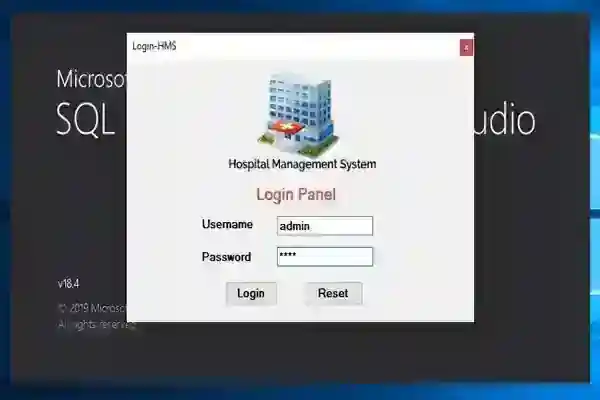
Hospital Management System in C# with Full Source Code The Hospital Management System is an automated system that is developed using C# and SQL Server. The main purpose of this Hospital Management System is to help hospital staff in managing the patient details, staff details and medical records. This is a user friendly system that anyone who uses it won’t find any difficulty in dealing with it. About the Hospital Management System In this Hospital Management System, the admin has to log in first through a log in system by providing the username and password. Then, he can now register a patient by entering personal details such as Name, Gender, Address, Age, Status, Disease, Room Number and Price. The admin can also view the Patient’s Checkout by entering the Patient’s Id that contains the Patient Name, Gender, Date In-Out, Building, Room Number, Type, Status, Medicine Price and Total Bill. This Hospital Management System has features such as add room information and staff details. So, if they want to look for a room in the hospital the admin will simply enter the building number, room type, status and price. While in managing staff details, the admin can view it by entering the staff Name, Gender, Position, Contact Details and salary. These are the following features of the Hospital Management System in C#
Patient Registration Patient Information Manage Payments Manage Rooms Manage Staff View Discharge
Download and install the following system requirements:
SQL Server Management Studio Microsoft Visual Studio 2015
How to setup the Hospital Management System in C# with Full Source Code
Download the zip file. Extract the downloaded zip file (HospitalManagementSystemCSharp) Open the SQL Server Management Studio Connect as a Windows Authentication Right click the database Click Attach Click Add and find the database (hospital.mdf) inside the HospitalManagementSystemCSharp folder Click ok
How to run the Hospital Management System
Open the folder HospitalManagementSystemCSharp and click HospitalManagementSystemCSharp.sln to open the system. Click the Server Click Connect to Database Add Connection Change the connection to Microsoft SQL Server Choose you server name And select the database name that you attach in the SQL Server Management Studio Click ok After that, press F5 to run the system
Accessing admin accounts Username: admin Password: pass This Hospital Management System in C# with Full Source Code is for educational purposes only. You can download it as a reference and expand your knowledge in making a system. You can freely modify it, according to your desire.
Screenshots
Download Project
