School Library System Using C# and MySQL Database Free Source Code
Introduction...

School Library System Using C# and MySQL Database Free Source Code
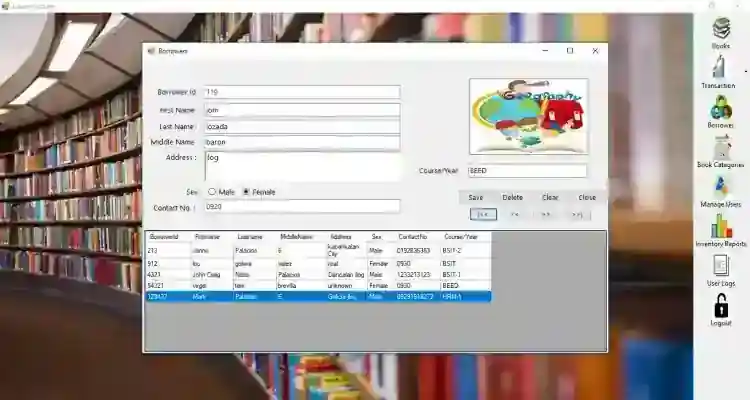
Introduction This Library system is an automated system that aims to simplify the way of issuing a book, save time and effort. With the use of this system, you can properly keep records of books issued, reissued, and those not returned. This eliminates the need to employ many workers because with the help of this system the librarian can accomplish the daily transactions by himself at a given time. This is an easy-to-use system that will enhance the efficiency of the library. About This Library System Free source code was developed using C#, MySQL Database, and SAP Crystal Reports. In this software, the librarian can list all the books along with some book details and can be easily retrieved. The software handles Borrowing and Returning Books Transaction of the Library. This has also a feature that manages Over Due Return Book that has a simple calculator that calculates/computes the borrower's penalty base to the penalty amount of the book. The software also generates reports which are the daily, weekly, monthly, and day wise transaction report and book list. These are the following features of the system
Manage Books Manage Borrowers Manage Transactions Manage Book Categories Manage Users Inventory Reports
List of Books Total Number of Books Daily Weekly Monthly Inclusive Dates
User Logs Login and Logout
How to Run Requirements: (Download and Install the following)
xampp latest version mysql-connector-net.msi mysql-connector-odbc.msi Microsoft Visual Studio 2015 or Later Version
Installation/Setup
Open your XAMPP/WAMP's Control Panel and start the Apache and MySQL. Extract the downloaded source code zip file. Locate the provided SQL file provided on the extracted source code folder. Browse the PHPMyAdmin in a browser. i.e. http://localhost/phpmyadmin Create a new database naming dblibrary. Import the provided SQL file. The file is known as dblibrary.sql. Locate the Solution File in the extracted source code folder. The file is known as LibrarySystem.sln. Open the solution file with your MS Visual Studio Software. Press the F5 key on your keyboard to run the Library System Software
Access this system using the admin account: Username: admin Password: admin DEMO
That's it! You can now explore the features and functionalities of this Library System in C#. I hope this will help you with what you are looking for and for your future C# Projects. Explore more on this website for more updates and free source codes. For more information about the system. You can contact me @ Email – [email protected] Mobile No. – 09305235027 – TNT FB Account – https://www.facebook.com/onnaj.soicalap Or feel free to comment below. Enjoy :)
Screenshots
Download Project
