Inventory Management System Using VB.NET and MySQL Database with Source Code
Doing an inventory can be a tough job but here’s a software-based inventory system that will keep your inventory balanced. This inventory system lets you track and monitor easily the inventory and sal...
Inventory Management System Using VB.NET and MySQL Database with Source Code
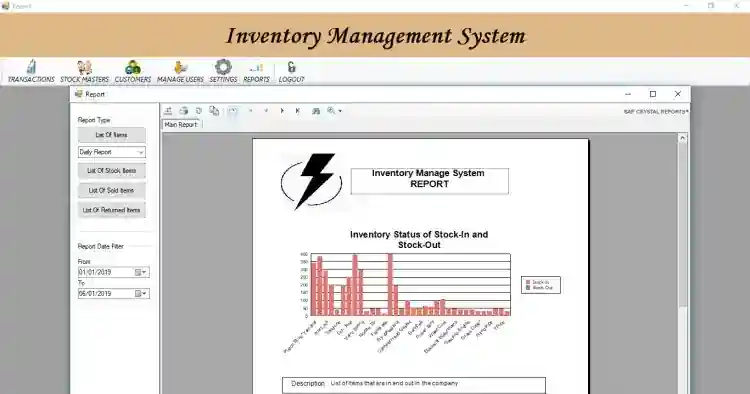
Doing an inventory can be a tough job but here’s a software-based inventory system that will keep your inventory balanced. This inventory system lets you track and monitor easily the inventory and sales. Aside from that, this system also includes tasks such as stock-in, stock-out, and return for products. This uses a variety of information or data to keep track of the product as they move through the process, including the number of items, price, etc. This software-based inventory system is more appealing to small businesses. The system stores the list of items and customers. The item categories and units are dynamically encoded in this project which can be managed at settings. The system also generates different reports such as the stock list and analytical summary of stock in and stock out reports.
These are the following features of the system
Manage Transaction
Stock-out
Stock Return
Stock Master
Manage Customer
Manage Users
Manage Settings
Generate Reports
Analytics Reports
Inventory Reports
Sales Reports
Login and Logout
This Inventory Management System in VB.NET and MySQL Database Project Source Codes is free to download. Feel free to download and modify the source code the way you desire. Follow the instructions below to run the project.
How to Run
Requirements: (Download and install the following)
XAMPP Latest Version
MySQL Connector
MySQL Odbc
Microsoft Visual Studio
Setup/Installation
Download and Extract the provided source code zip file. (download button is located below this article)
Open Your XAMPP's Control Panel and Start the "MySQL" for the database and "Apache" so you can use PHPMyAdmin to import the SQL file.
Locate the provided database SQL File along with the source code. The file is known as "db_inventory.sql".
Open a browser and browse the PHPMyAdmin. i.e. http://localhost/phpmyadmin
Create a new database naming "db_inventory".
Import the SQL file provided in your newly created database.
Locate the project's solution file in the extracted source code folder. The file is known as "InventoryManagementSystem.sln".
Open the solution file with your MS Visual Studio software.
Press the "F5" key on the keyboard to run the project.
Admin Credentials
Username: admin
Password: admin
Demo
That's it! You can now explore the features and functionalities of this project. I hope this VB.NET and MySQL Database Project will help you with what you are looking for.
For more information about the system. You can contact me @
Email – [email protected]
Mobile No. – 09305235027 – TNT
FB Account – https://www.facebook.com/onnaj.soicalap
Or feel free to comment below.
Screenshots

Download Project
