Library Management System using VB.NET and MySQL with Source Code
This is Library Management System is an automated system that is specially designed for school libraries. Its main goal is to help keep the records of every transaction of the books that is available ...
Library Management System using VB.NET and MySQL with Source Code
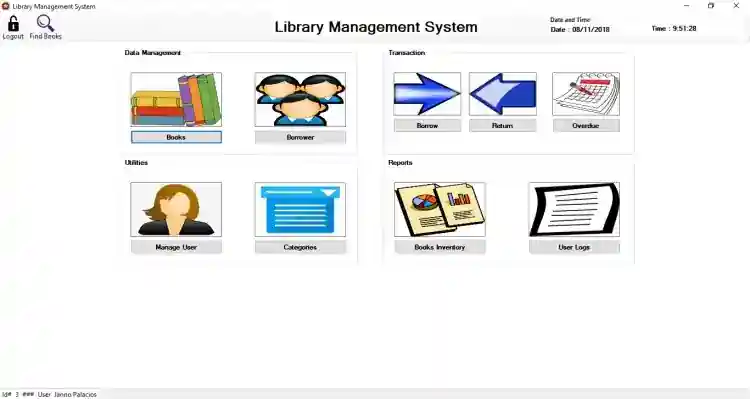
This is Library Management System is an automated system that is specially designed for school libraries. Its main goal is to help keep the records of every transaction of the books that is available inside the library. It’s a user-friendly system that means all functions are easy to learn and easy to use by the admin and even by occasional users. It also provides reports to know how many books are issued to a particular student. And with this, the librarian can easily track the status of a book and who has borrowed it. Then, it automatically calculates fines for late returns. This does not just provide efficiency but it also frees up more time for other tasks. At the same time, you are confident that all information is well stored in the database.
These are the following features of the system
Books
Add Book
Retrieve Books
Update Book
Delete Book
Borrower
Add New Borrower
Retrieve Borrower
Update Borrower
Delete Borrower
Print Library Card
Transaction
Borrow Books
Return Books
Overdue with Payments
Category
Add New Category
Retrieve Categories
Update Category
Delete Category
Manage Users
Add New User
Retrieve Users
Update User
Delete User
Report
Inventory of Books
List of Books
Total Number of Books
Daily
Weekly
Monthly
Inclusive Dates
User Logs
Login and Logout
How to Run
Requirements:
Download and Install the following
xampp latest version
mysql-connector-net-6.4.4.msi
mysql-connector-odbc
Microsoft Visual Studio
Installation
Download and Extract the source code zip file. (download button is located below)
Open your XAMPP's Control Panel and start "Apache" and "MySQL".
Locate the provided SQL file in the extracted source code folder. The file is known as dblibrary.sql.
Open a browser and browse the PHPMyAdmin. i.e. http://localhost/phpmyadmin
Create a new database naming dblibrary
Import the SQL file.
Locate the Solution file inside the source code folder known as LibrarySystem.sln
Open the solution file with your MS Visual Studio Software.
Press the "F5" key on your keyboard to run this Library Management System.
Admin Access Information:
Username: admin
Password: admin
DEMO
That's it! Feel free to modify the source code the way you wanted. I hope this Library Management System Project in VB.NET and MySQL.
For more information about the system. You can contact me @
Email – [email protected]
Mobile No. – 09305235027 – TNT
FB Account – https://www.facebook.com/onnaj.soicalap
Screenshots

Download Project
