Student Performance Management System in VB.Net and MySQL Database with Full Source Code
Student Performance Management System in VB.Net and MySQL Database with Full Source Code The Student Performance Management System in VB.Net is a simple desktop application that is made up of Visual B...
Student Performance Management System in VB.Net and MySQL Database with Full Source Code
Student Performance Management System in VB.Net and MySQL Database with Full Source Code
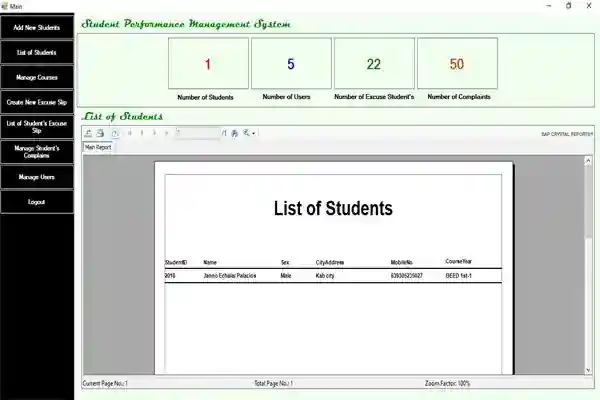
The Student Performance Management System in VB.Net is a simple desktop application that is made up of Visual Basic.Net and MySQL for the database. It solely contains an admin/guidance staff that is in charge of all the management of the Student Performance Management System in Vb.Net. This also includes an SMS notification which is very useful tool in sending the information to the parents.
About the Student Performance Management System in VB.Net
The Student Performance Management System in VB.Net is designed as a user friendly system that even beginners won’t find any difficulty in navigating all the functions. The main purpose of this Student Performance Management System in VB.Net is to help the school guidance counselor to understand the behavior of every student and they can assist a student who needs guidance and counselling. In this Student Performance Management System in VB.Net, the admin/guidance has the ability to easily monitor the behavior of students by checking their records of how many times they have been called inside the guidance office because of complaints or violations. An SMS Notification, is used here so the admin can send a message to the parents if their child/children did something wrong inside the school campus and their presence is needed.
These are the following features of the Student Performance Management System in VB.Net
Dashboard
Add New Student
List of Students
Manage Courses
Create New Excuse Slip
List of Student’s Excuse Slip
Manage Student’s Complaints
Manage Users
Login and Logout
Download and install the following system requirements:
XAMPP
Visual Studio 2015
How to setup Student Performance Management System in VB.Net with Full Source Code
Download the zip file.
Download and install XAMPP
Run the XAMPP control panel and start MySQL and Apache
Extract the downloaded zip file (student performance management system) inside the folder
Open the browser and go to http://localhost/phpmyadmin/ to create the database
Click the new to create a database.
Name the database sourcecodester_sgmsdb
Click import to import the sql file.
Click choose file and select the file that can be found inside the student performance management systemfolder
Click go.
How to run Student Performance Management System in VB.Net
Open the folder " student performance management system"
Click SGMS.sln to open the system.
Press F5 to run the system.
Accessing admin accounts
Username: admin
Password: admin
This Student Performance Management System in VB.Net and MySQL Database with Full Source Code is for educational purposes only. You can download it as a reference and expand your knowledge in making a system. You can freely modify it, according to your desire.
Screenshots

Download Project
